
Reviving GLPI Agent Abuse with ESC17
This article explores how ESC17 certificate abuse revives an old GLPI agent tactic, enabling attackers to achieve RCE without needing access to the GLPI server.
TL;DR : This article is about an extension to a known abuse of an attack on GLPI thanks to ESC17. It details the way the abuse works, mentions our public tool that we adapted to work with ESC17 and finally provides some defensive insights.
What is GLPI?
GLPI is an Open-source IT asset management and service desk solution that is used by organizations for inventory tracking, ticket management, and - most interestingly for us attackers - remote deployment and management.
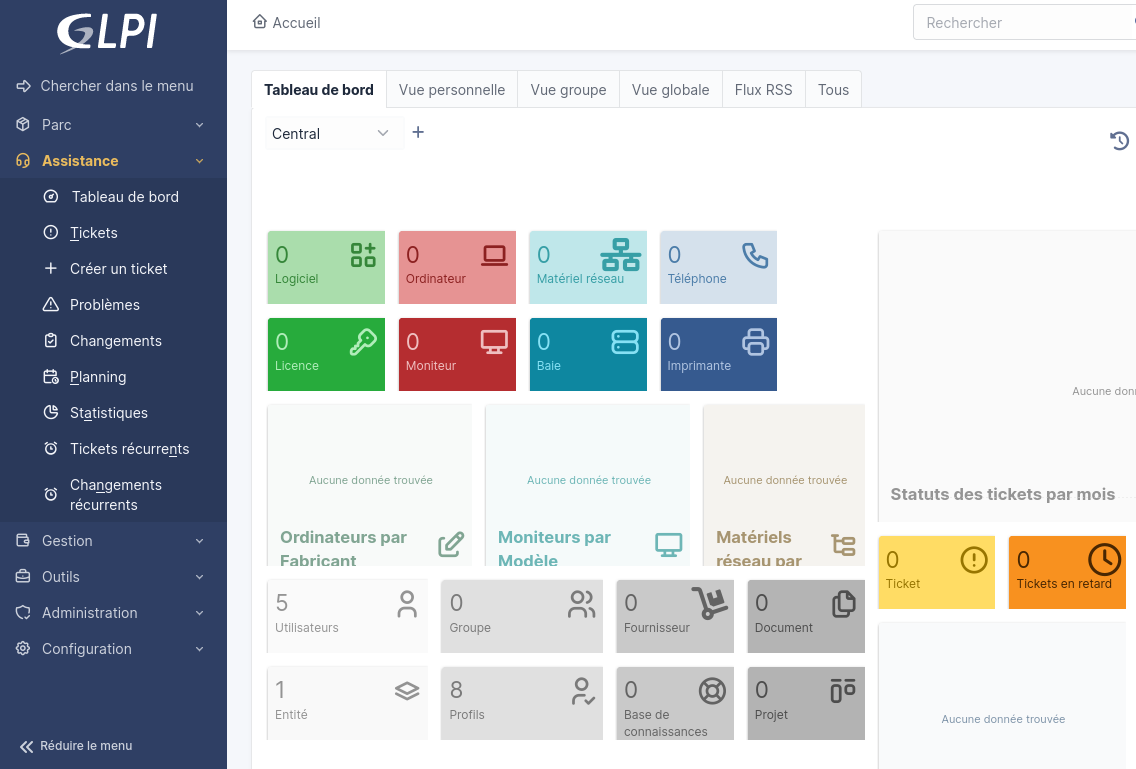
Of course, it has for long been a prime target for an attacker landing inside an active directory. GLPI servers, once compromised, provide the attackers with a list of valid domain users usernames and sometimes password, a valid LDAP bind account username and password if connected to the AD, pivot from a host that usually has an interesting network access etc. The sheer number of vulnerabilities in GLPI core and plugins being of course a factor for its popularity among Active Directory pentesters.
However, as we will see in this article, GLPI can also be abused to trigger remote code execution on other hosts through the inventory/deploy mechanism, and ESC17 just made it a lot easier.
What is GLPI Inventory/deploy ?
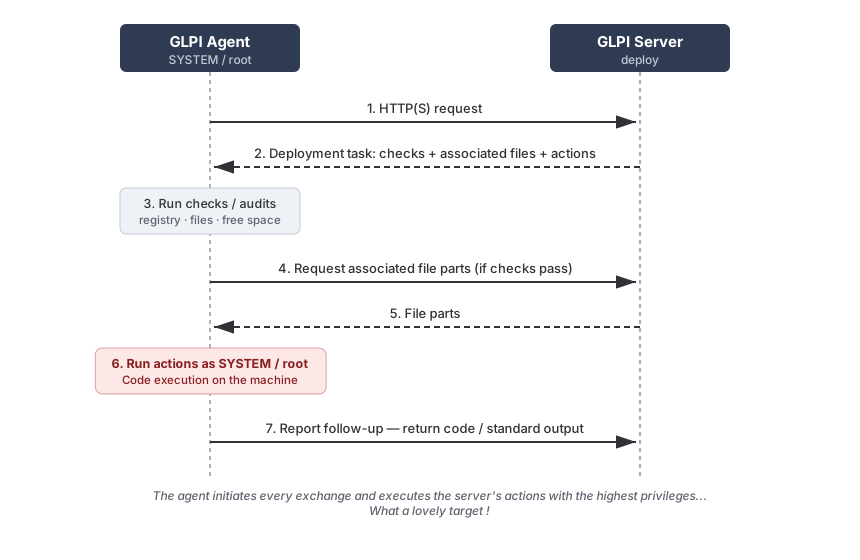
GLPI Inventory/deploy is a mechanism that allows legitimate admins to push updates from the master server to controlled hosts over HTTP(S).
The exchange follows a pull model: The agent is the one to start every session. When an agent reaches out, the server sends back a deployment task made of three kinds of items :
- pre-install checks (registry values, file existence and free-space verification)
- associated files to download
- actions to run, one of :
- execute an order
- create or delete directory
- move or copy a file
The agent runs the audits first, downloads the files only in the case of success, and then executes the actions and reports back to the server.
GLPI Inventory/deploy from an attacker’s perspective
As an attacker this is part great, part annoying.
The great part is that the agent trusts whatever the server returns, and carries out those actions with the highest privileges on the host.
On top of that, this behavior was not some exotic opt-in but the default up to v1.7.3. This only changed with v1.8, where, as per the documentation “no other task is selected by default”. Note that agents installed and upgraded keep their behavior.
Thus, if an administrator thinks that the GLPI agent is safe because of deploy not being enabled on the server, he was mistaken as the agent was still polling it.
| Version | behavior | security impact |
|---|---|---|
| < 1.8 (1.7.3 being the latest) | Tries to pull deploy instructions by default even without the server being configured to handle them | Compromise of GLPI or MitM leads to SYSTEM:root execution |
| >= 1.8 but upgraded from a < 1.8 install | same as above | same as above |
| installed at >= 1.8 | No deploy actions by default | Needs to be configured by the administrator in order to be vulnerable |
The annoying part as an attacker is that there is no way of triggering the pull, it happens on fixed schedule (with delays usually ranging from 1h to 24h). Not the end of the world, but it means the tool should run in the background hoping to catch a connection from the target, and if your engagement goes from 9 to 5 while the GLPI server is checked at 2AM … well, too bad.
What is ESC17?
In an Active Directory, the Active Directory Certificate Services (AD CS) delivers certificates that are trusted by the machines in the domain. There are vulnerabilities allowing attackers to escalate (thus called “ESC” vulnerabilities) to a more privileged account.
ESC17 happens when a user is able to:
- request certificates that can be used for Server Authentication (this is contained in the Extended Key Usage or EKU field)
- choose for which identity this certificate is issued (
Enrollee Supplies Subject, the request field specifies who the subject of the certificate will be) - get himself in a position where this certificate can be used to appear like a server and profit from it
This enables impersonation of any server in the environment, and can be found in more detail on the original article on the attack as well as this deep dive in the ESC17 usage.
Abusing the GLPI Deploy feature 101
Summary of the base attack
The idea of the attack is to spin a rogue GLPI server (or a tool that mimics the deploy part) and get the client to connect to us rather than the real GLPI server.
This attack is quite interesting since GLPI agents are configured to periodically request deployment tasks and run these tasks with administrator privileges (NT AUTHORITY\SYSTEM on Windows machines, root on Linux machines). Another factor making this attack compelling is that the binaries are not required to be signed by Microsoft (contrary to WSUS’ behavior for instance).
So for now the attack pretty much looked either like this when the client had not properly configured TLS certificate checking (either using HTTP or disabling TLS certificate checking) :

Or like this when the client had proper TLS checking, but the attacker had found a vulnerability in the GLPI server itself :

The base attack’s mitigation
So, much like WSUS in the original ESC17 publication, the main attention point to secure the deploy exchange for now was to force using HTTPS and enable SSL checks.
Without this, an attacker could for years use a tool such as our just publicly released tool GLPwnIou (Pronounced “G - L - Pwn - You” in French) to fake a rogue GLPI server and send malicious payloads for the agents to happily install.
TL;DR: as long as HTTPS and certificate checking were in place, the only way to push malicious code to the managed clients was to compromise the GLPI server. Until ESC17.
The ESC17 Twist
ESC17’s consequence is that the attacker can act as any server as long as the client is tricked into connecting to it rather than the real GLPI server (referred to as a MitM position, even though technically it is more of a rogue position) and only relies on TLS certificate checks (which GLPI does).
Now the attack becomes :
- Request a certificate from an ESC17-vulnerable ADCS template (certipy’s wiki is a gold mine in regard to that). This certificate will thus contain the FQDN of the legitimate GLPI server and an EKU that enables server authentication.
- Get a MitM position (more about this later on)
- Profit

The attack itself
GLPwnIou: Becoming a - somewhat limited - GLPI Server

GLPwnIou is a rogue GLPI server implementation for obtaining RCE on managed devices. It thus only implements the routes that may be of use for this purpose and will not look like a GLPI server to anything else including end users or IOC-enabled SOCs.
This tool listens on configurable ports (80 for HTTP, 443 for HTTPS) and when agents connect, responds with deployment tasks containing:
- Arbitrary commands (PowerShell, bash, etc.)
- Malicious binaries (beacons, reverse shells, etc.)
- Custom executables with flexible execution options
It can handle :
- HTTP mode (agents using unencrypted connections)
- HTTPS with self-signed certificates (for agents with disabled SSL checks)
- HTTPS with valid ESC17 certificates
Don’t hesitate to check the detailed usage at https://github.com/FenriskSecurity/glpwniou. It can be installed with a simple
pipx install GLPwnIou
Getting a MitM position
There are several ways of getting the GLPwnIou in the MitM position including :
- Abusing the IPv6 priority configured by default on Windows and advertise oneself as the GLPI server using MitM6
- Doing some ARP spoofing with a tool like Bettercap (this is the route that wsuks went)
- Registering a DNS entry if it was left blank after a removal/change, but the agents are still configured with this entry, or abusing a right to edit said entry as mentioned in this article.
Video demonstration
Mitigations
Certificate-level controls
This is the real patch to the problem. Restrict who can request certificates from a Server Authentication templates and/or remove the Enrollee Supplies Subject (follow certipy’s recommendations). And remember to audit certificate requests regularly, especially templates with allow enrollment on behalf of another Subject.
However, defense in depth does not stop there.
Other mitigations
Network controls: Segment GLPI server traffic with VLANs and firewall rules, disable the use of IPv6 if it is not required (to prevent MitM6), alert on dubious DNS changes and ARP anomalies/high-density traffic.
Agent configuration: Force HTTPS with strict certificate validation, disable unused deployment features (now on by default, but not retroactively for older agents), and keep agents regularly updated. Implement certificate pinning on agents where possible.
Indicators of Compromise
If you are a defender, be on the lookout for the following clues :
- Monitor events 4886 and 4887 for certificate request/issuance for the GLPI FQDN whose enrollee is not supposed to be requesting such certificates. For a full picture of this, it is necessary to enable auditing on the CA (
certutil -setreg CA\AuditFilter 127and toggling on the “Audit Certification Services” audit policy). Note that to get the SANs, one may have to usecertutil -viewas these are not always logged. - Monitor network segmentation violations (agents contacting unexpected IPs).
- Monitor GLPI-Agent processes directly spawning a
cmd.exeorpowershellor writing to the default file inC:\Windows\Temp\pwned.fenrisk - It is interesting to look for GLPI responses with the hardcoded ID used by the tool (
"0fae2958-24d5-0651-c49c-d1fec1766af6"), and lacking the usual GLPI HTTP headers (server banner, PHP headers …). But note that the removal of such IoCs is easy enough that this should not be used solely.
Note that if we consider the older abuse where the attackers compromised the GLPI server to push a malicious package, looking for suspicious deployment tasks in GLPI logs is still necessary.
Appendix: References, acknowledgements and previous works
wsuksfrom @al3x_n3ff for the inspiration- The “No-CVE” That Still Bought Us Domain Compromise Two Years Later from javier_at_labs who happened to concurrently publish an article on the same topic as the one we were researching
- The fully detailed certipy wiki on ESC17
- ESC17: From ADCS Misconfiguration to WSUS Client Compromise via DNS Zone Abuse from mustafandurukan showcasing the DNS modification rather than the classical Man in The Middle attack
- The official GLPI documentation

Raphaël Lacroix est expert en sécurité offensive à Fenrisk. Passionné par la sécurité web et Linux, il s'intéresse également aux nouvelles classes de vulnérabilités dans les environnements Active Directory et l'écosystème des Intelligences Artificielles.
Keep reading
Remote code execution in CentOS Web Panel - CVE-2025-70951
As part of our ongoing research into web hosting control panels, we recently published an analysis of Control Web Panel (CWP), a widely used open-source administration panel designed to manage web servers running…
Remote code execution in aaPanel - CVE-2025-48702
aaPanel is a free and open-source web hosting control panel designed to simplify server management for Linux-based systems. It provides a graphical interface to manage web servers, websites,…
Remote code execution in CentOS Web Panel - CVE-2025-48703
CentOS Web Panel (CWP) is a free web hosting control panel used to manage servers based on CentOS and other RPM-based distributions. CWP was first introduced in 2013 as a free, open-source web hosting control panel…