
Detecting Jira & Confluence Versions and Mapping Known CVEs
This blog post presents a tool that identifies the version of the Atlassian Jira or Confluence application and maps the identified version to a local CVE database. The detection is primarily based on the presence of…
TL;DR
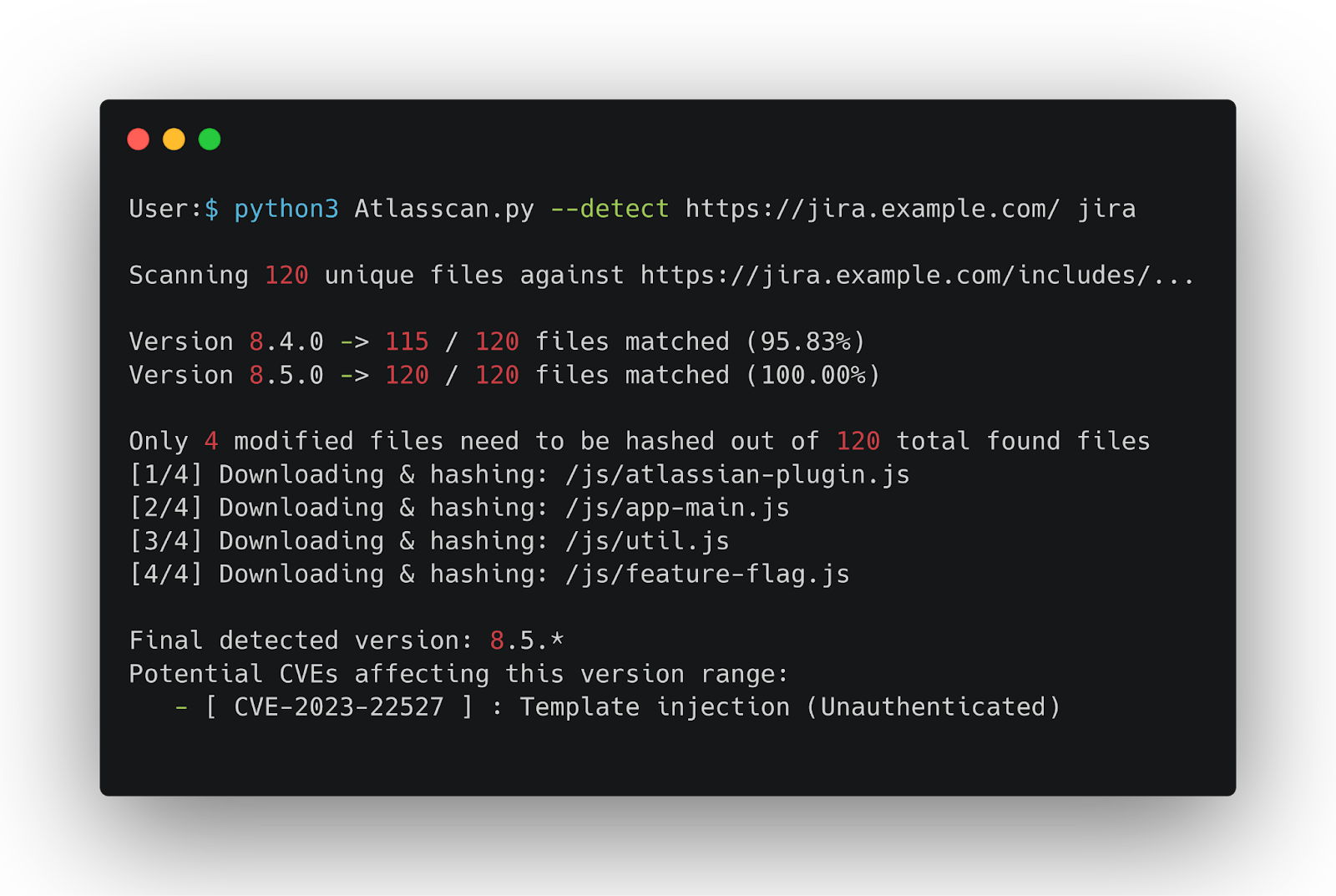
This blog post presents a tool that identifies the version of the Atlassian Jira or Confluence application and maps the identified version to a local CVE database. The detection is primarily based on the presence of JavaScript files and SHA256 hashes. The tool first tries to get the version from application pages (if available); if it fails, it will try to get the version by matching files and file hashes. It also supports adding new versions and updating the CVE database for future detection and vulnerability mapping.
- The script attempts to read the version directly from web pages/resources exposed by the application (if available).
- If no version is found, the tool scans
/includes/files (JS) , compares which files exist versus the database for known versions, and narrows candidate versions. - For files that differ between candidate versions, the script gets them and computes SHA256 hashes to identify the exact version (or the narrowest range possible).
- A local
cve_database.jsonmaps product → CVE → version ranges, allowing fast correlation and alerting. - New versions and CVEs can be added to the database to improve future detection.
Why this approach?
Many Atlassian web applications have static assets (especially JS) whose filenames and contents change predictably between releases. By maintaining a small database of which JS files (and their SHA256 hashes) are in each product version, we can :
- Quickly identify which version is exposed.
- Automatically correlate the detected version with known CVEs.
This approach is not intrusive, as it only sends simple HTTP requests against publicly accessible resources.
How it works — step by step
- Quick page-based detection (fast path): The script first tries a few application pages that often include version numbers; examples in the code are paths like
/,/login.action,/about/about-page-content.vm. A regex looks for patterns like Confluence X.Y.Z or HTML elements/meta tags with version content (e.g., name=“ajs-version-number” or inputs named JiraVersion). If a version is found here, it’s returned immediately. - File-presence scan (fallback): If page-based discovery fails, the tool enumerates a local JSON database (
files\_per\_version\_\*.json) that maps known versions → list of JS paths. It sends HEAD requests to the targetBASE_URL/includes/<file>in order to determine which files exist and builds match ratios for all known versions. - Detect modified files across candidate versions: For candidate versions that have some file sets in common, the script determines which files contain differing SHA256 values between those versions. Only the modified files are downloaded (with curl) and hashed locally (with sha256sum) to prevent unnecessary downloads.
- Hash-based filtering: The calculated hashes are compared with the expected hashes in
files_per_version_*_hash.jsonto narrow down the candidates to an exact version or the tightest possible version range. - CVE correlation and database updates: The script loads a local
files/cve_database.jsonmapping CVEs to version ranges. New CVEs are also added directly through the tool.
Once the version(s) are identified, the tool returns CVE IDs whose version ranges cover the identified version(s).
Usage (examples)
Detect a product version
Add a new version (from an archive URL)
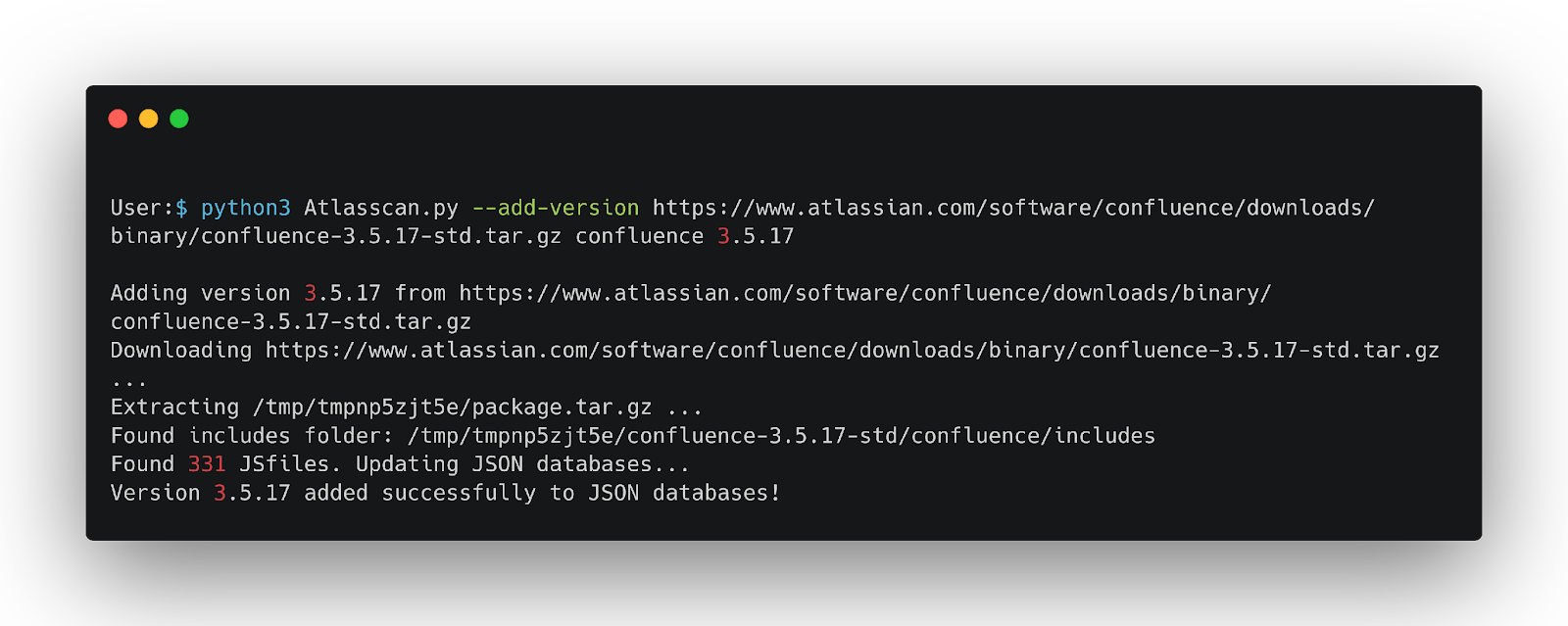 This will:
- Download the archive, and extract it to a temp dir.
- Attempt to find the
includes/folder inside the archive and collect .js files. - Compute SHA256 hashes and update
files/files_per_version_jira.jsonandfiles/files_per_version_jira_hash.json. - Future detection will automatically include this new version.
Add or update a CVE in the local DB
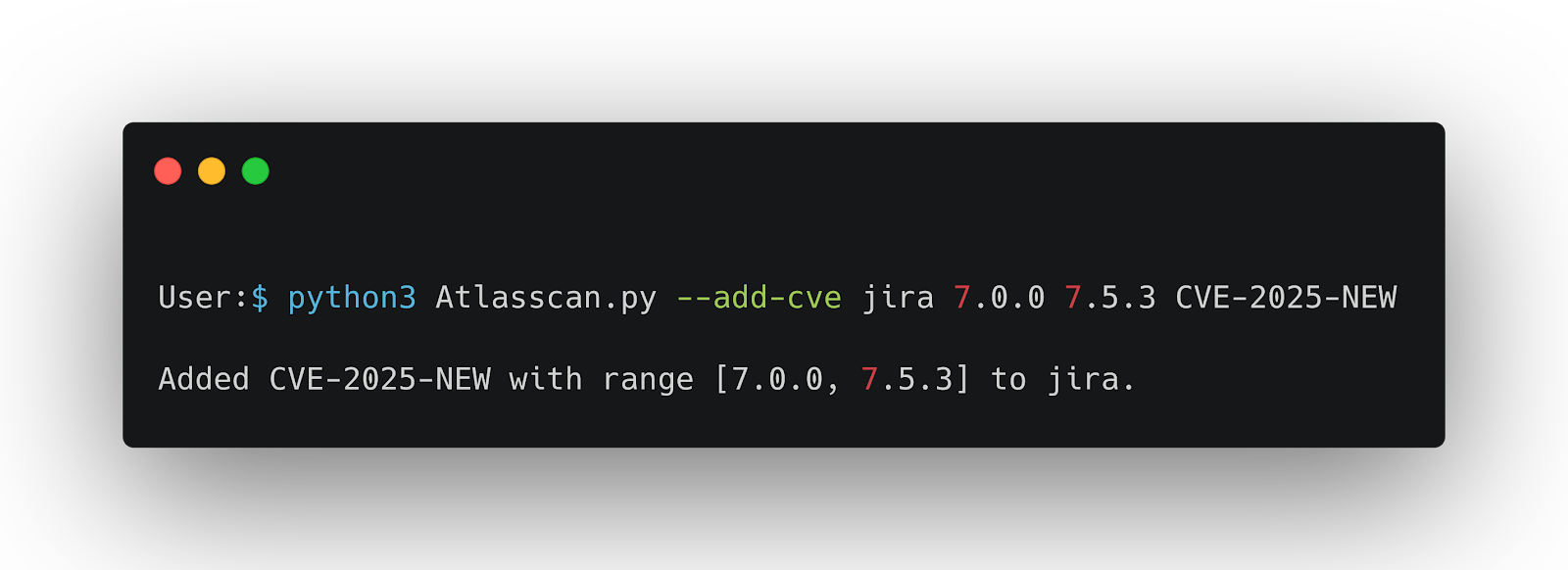
This modifies cve_database.json so that future detections will consider this CVE.
Limitations
- If the system cannot identify the exact file version, it will return the closest possible (approximate) match.
- Maintain a current file database (versions and hashes) to increase the detection accuracy.
- Maintain the CVE database consistently updated to provide accurate vulnerability mapping.
The source code of the project is available on our GitHub

Youssef Azefzaf est expert en cybersécurité et sécurité offensive. Passionné et actif dans la communauté des hackers éthiques, il se spécialise dans les tests d’intrusion et l’audit de systèmes, contribuant à une cybersécurité innovante et efficace.
Keep reading

MCPwned: a Burp Suite extension for auditing MCP servers
This blog post quickly outlines the MCP protocol before presenting a Burp Suite extension developed by Fenrisk that enables pentesters to effectively test MCP servers.
Remote code execution in aaPanel - CVE-2025-48702
aaPanel is a free and open-source web hosting control panel designed to simplify server management for Linux-based systems. It provides a graphical interface to manage web servers, websites,…
Remote code execution in CentOS Web Panel - CVE-2025-48703
CentOS Web Panel (CWP) is a free web hosting control panel used to manage servers based on CentOS and other RPM-based distributions. CWP was first introduced in 2013 as a free, open-source web hosting control panel…